URGENT SUPPORT: API Not Returning Booking Details by ID

Dear SimplyBook Support Team,

We would like to retrieve the booking details for a specific booking using the booking ID via API.

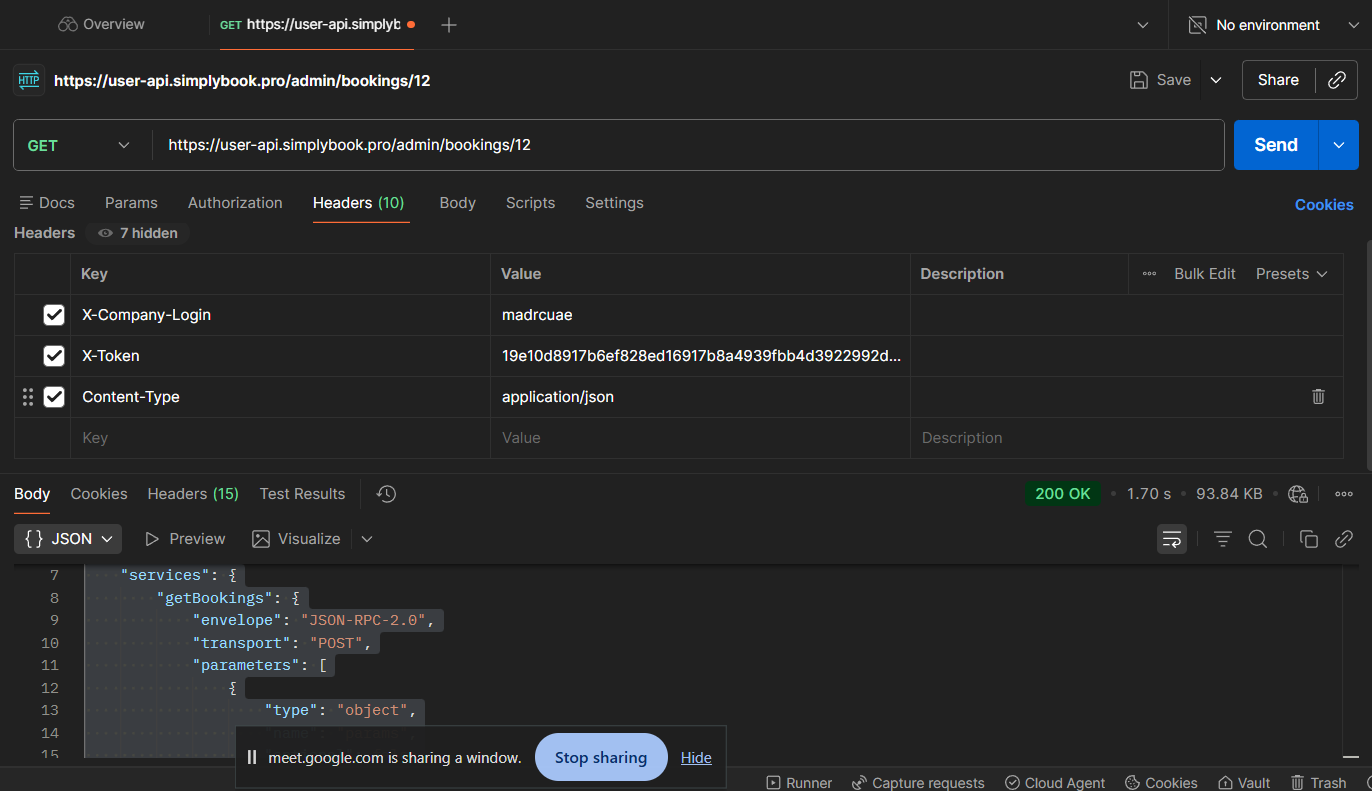
Currently, we are sending a POST request with the booking ID, but instead of receiving the proper booking details, we are getting the SMD (service metadata description) response.

The response we are receiving includes service definitions such as:

  • getBookingDetails

  • cancelBooking

  • getClientInfo

  • and other service methods

It appears that we are hitting the service description endpoint instead of the actual method execution.

What We Need Assistance With:

  1. The correct Postman request configuration to retrieve booking details by booking ID

    • Correct endpoint URL

    • Required headers

    • Proper JSON body structure

    • Authentication method

  2. A sample correct API request and response for:

    • Retrieving booking details using booking ID

    • Canceling a booking using booking ID

  3. Clarification on whether we need to call the method using JSON-RPC format (with "method", "params", "id" structure) instead of sending the ID directly to /admin/bookings/{id}.

We have attached:

  • Screenshot of our Postman request

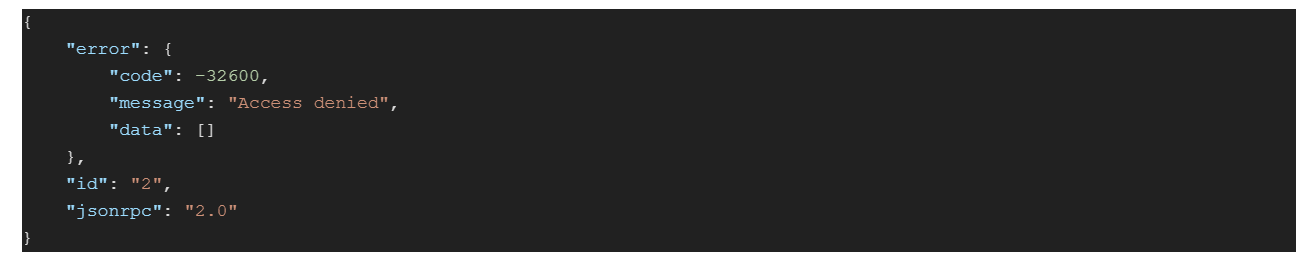
  • Screenshot of the response

  • The JSON response we are currently receiving

Please guide us with the correct API request format so we can properly fetch booking details and cancel bookings programmatically. Almost garbage data coming in response

Looking forward to your assistance.

{
“transport”: “POST”,
“envelope”: “JSON-RPC-2.0”,
“contentType”: “application/json”,
“SMDVersion”: “2.0”,
“target”: “/admin/bookings/12”,
“services”: {
“getBookings”: {
“envelope”: “JSON-RPC-2.0”,
“transport”: “POST”,
“parameters”: [
{
“type”: “object”,
“name”: “params”,
“optional”: false
}
],
“returns”: “object”
},
“pluginZapierSubscribe”: {
“envelope”: “JSON-RPC-2.0”,
“transport”: “POST”,
“parameters”: [
{
“type”: “string”,
“name”: “url”,
“optional”: false
},
{
“type”: “string”,
“name”: “notificationType”,
“optional”: false
}
],
“returns”: “boolean”
},
“pluginZapierUnsubscribe”: {
“envelope”: “JSON-RPC-2.0”,
“transport”: “POST”,
“parameters”: [
{
“type”: “object”,
“name”: “url”,
“optional”: false
}
],
“returns”: “boolean”
},
“getBookingDetailsZapier”: {
“envelope”: “JSON-RPC-2.0”,
“transport”: “POST”,
“parameters”: [
{
“type”: “object”,
“name”: “id”,
“optional”: false
}
],
“returns”: “array”
},
“getBookingDetailsZapierMock”: {
“envelope”: “JSON-RPC-2.0”,
“transport”: “POST”,
“parameters”: [],
“returns”: “array”
},
“getClientInfo”: {
“envelope”: “JSON-RPC-2.0”,
“transport”: “POST”,
“parameters”: [
{
“type”: [
“integer”,
“string”
],
“name”: “clientId”,
“optional”: false
}

i want the following data instead of garbage data
Hi Warda,

The response you’re seeing is the SMD (Service Metadata Description) — this is returned when you call the endpoint without a proper JSON-RPC method body. It’s essentially the API’s “directory” of available methods, not an error.

Our Admin API uses JSON-RPC 2.0, so you need to POST a properly structured JSON-RPC call rather than hitting a REST-style URL like /admin/bookings/12.

Step 1 — Authenticate and get a token

First, get a session token:

POST https://user-api.simplybook.me/admin/auth
Content-Type: application/json

{
  "jsonrpc": "2.0",
  "method": "getUserToken",
  "params": ["YOUR_COMPANY_LOGIN", "YOUR_API_KEY"],
  "id": 1
}

Save the token from the response.

Step 2 — Get booking details by ID

POST https://user-api.simplybook.me/admin/bookings
Content-Type: application/json
X-Company-Login: YOUR_COMPANY_LOGIN
X-User-Token: YOUR_TOKEN_FROM_STEP1

{
  "jsonrpc": "2.0",
  "method": "getBookingDetails",
  "params": [BOOKING_ID_HERE],
  "id": 2
}

Replace BOOKING_ID_HERE with an integer (e.g. 12), not a string.

Step 3 — Cancel a booking by ID

POST https://user-api.simplybook.me/admin/bookings
Content-Type: application/json
X-Company-Login: YOUR_COMPANY_LOGIN
X-User-Token: YOUR_TOKEN_FROM_STEP1

{
  "jsonrpc": "2.0",
  "method": "cancelBooking",
  "params": [BOOKING_ID_HERE],
  "id": 3
}

Key things to check in Postman:

  • The URL should end in /admin/bookingsnot /admin/bookings/12 (the ID goes in the params array, not the URL)

  • Both X-Company-Login and X-User-Token headers are required

  • Content-Type: application/json must be set

  • The body must be raw JSON, not form-data

You can find your company login and API key in your SimplyBook.me admin panel under Integrations → API.

Let us know if you need further help!

I attempted to execute the endpoint as per the above suggestions and encountered this error. Please share this with the SimplyBook team.

https://drive.google.com/file/d/1zXkPZpXakFO0IDxlJ2qMMpwJcaOJGu3V/view?usp=sharing

Plese provide your raw http request and error you have here as text

Request:

postman request POST ‘https://user-api.simplybook.pro/admin/bookings’ \
–header ‘Content-Type: application/json’ \
–header ‘X-Company-Login: madrcuae’ \
–header ‘X-User-Token: 38d78c46719acbeab8edb11d34378964ac2ec80b6a4755257185f74ae98a1d6e’ \
–body ‘{
“jsonrpc”: “2.0”,
“method”: “getBookingDetails”,
“params”: [1218],
“id”: 2
}’

Response:

Hi Warda,

The -32600 Access denied means the token you’re passing in X-User-Token is not a valid session token. You’re likely using your API key directly, but it needs to be exchanged for a session token first.

Step 1 — Get a session token

POST https://user-api.simplybook.pro/admin/auth
Content-Type: application/json

{
  "jsonrpc": "2.0",
  "method": "getUserToken",
  "params": ["madrcuae", "YOUR_API_KEY"],
  "id": 1
}

The response will contain a result field — that string is your session token.

Step 2 — Use that session token in your booking request

POST https://user-api.simplybook.pro/admin/bookings
Content-Type: application/json
X-Company-Login: madrcuae
X-User-Token: <result from step 1>

{
  "jsonrpc": "2.0",
  "method": "getBookingDetails",
  "params": [1218],
  "id": 2
}

The long string you currently have in X-User-Token looks like an API key — that goes into the getUserToken params call, not into the header directly.

You can find your API key in the SimplyBook.me admin panel under Integrations → API → API key.

We are already using the session token in our request, not the API key.

Here is the API key :
71272f55bd67d5ef73e3151569e00cb6f83c1c267684b26171b5c45f13859c95

Here is the secret key :slight_smile:
0c7a4b1112f78d21538236d2ef4a28253f7638a7da0f06932bdecdcbc2ca0169

so, you generate a session token yourselves to test the endpoint and investigate the issue further.

Hi @warda ,

The reason is that you are trying to login with public keys to admin API.

For public API you should use:

https://user-api.simplybook.pro/login endpoint and getToken JSON-RPC method. And then use https://user-api.simplybook.pro/ endpoint. with public methods. ( API documentation | SimplyBook.me Online Scheduling )

For admin API you can use REST API or JSON RPC.

For JSON-RPC: https://user-api.simplybook.pro/login endpoint and getUserToken method. And then use https://user-api.simplybook.pro/admin/ endpoint with admin methods. ( API documentation | SimplyBook.me Online Scheduling )

Note that for admin authorization you should pass login/password of user.

For REST API (admin only):

POST https://user-api-v2.simplybook.pro/admin/auth
Content-Type: application/json

{
“company”: “”,
“login”: “”,
“password”: “”
}

Please let me know if you need any help.

Please look login and password of this
login : https://madrcuae.secure.simplybook.pro/
password : warda.dev.code@gmail.com

Please show the entire endpoint setup in Postman. Once you correctly set up the endpoint correctly and retrieved the booking details, the cURL so I can set up the endpoint in my automation . please

Hey support , Please response me im wating for your response

Hey Support team please reply

Hi,

### Get auth token. It stores token in variables after this call you can call any HTTP request from api directory.
POST {{ host }}/admin/auth/token
Content-Type: application/json

{
  "company": "{{ company }}",
  "login": "{{ login }}",
  "password": "{{ pass }}"
}
### Get booking details
GET {{ host }}/admin/bookings/1
Content-Type: application/json
X-Company-Login: {{ company }}
X-Token: {{ token }}
### Cancel booking
DELETE {{ host }}/admin/bookings/1
Content-Type: application/json
X-Company-Login: {{ company }}
X-Token: {{ token }}
### Get list of bookings 
GET {{ host }}/admin/bookings?filter[upcoming_only]=1
Content-Type: application/json
X-Company-Login: {{ company }}
X-Token: {{ token }}

All of these are REST API admin API.